Little-known iPhone feature is hailed a 'game changer' for people who travel

There's a new feature on the iPhone that every user needs to know about if you’re planning to up your travel game this year.
Travel is quite the hassle at times, particularly when it comes to managing the various different planning aspects.
For example, your currency conversion.
Advert
Imagine paying for something you have mentally calculated as being a couple of dollars, only to realize that you’re completely wrong and now you’re left with pittance for the rest of your trip...

It’s not exactly a farfetched scenario, and it’ll cause you more than just a headache as it means you’re having to scrimp and save just to pay for some yummy food on your vacation.
Thankfully, if you have an iPhone (sorry Android users) then you don’t have to worry about this.
There's a little feature on your smartphone that’ll help you with managing your money, and it’s totally free.
If you didn’t know, your calculator app has upgraded thanks to the iOS 18 update.
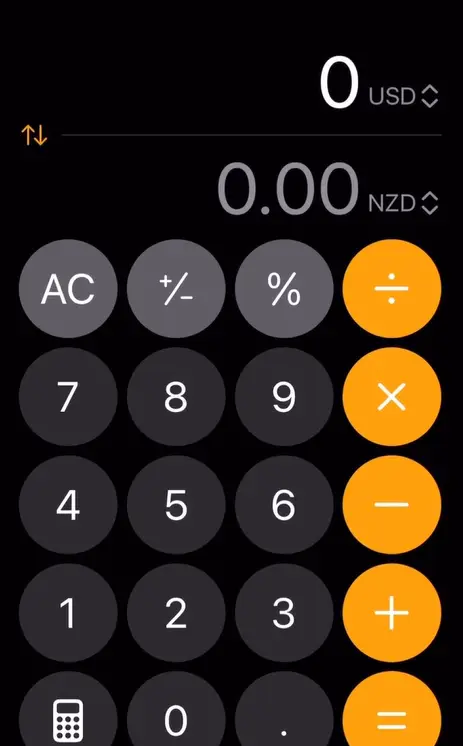
Instead of being useful for simple math, you can also use it to convert your money to multiple currencies too.
According to Instagram user @lifeofthetravelingpin, this ‘game changer’ should be widely known.
She said in a post alongside a reel showing people how to use it: “DON’T miss this travel hack! It works without data too.
“This is a crazy new update for @apple Iphone users! SAVE this for your next international trip and SHARE it with a friend!
“As someone who is always traveling, I have a currency converter open on my phone at all times. I used to dread those moments at the market trying to quickly calculate prices in my head. Fumbling with a currency converter app while offline was always a bit stressful. Can you relate?! If so, keep reading! This NEW feature not only is it easily accessible, but it also works without data AND easily switches to input the local currency or your home currency. Now you can easily convert currencies directly from your phone, even when you don’t have an internet connection.”
So, how do you use your calculator to convert currencies?
First, you’ll need to go to the Calculator app and tap the Calculator Mode button.
Then press on your ‘Convert’ selection and select ‘Currency’ from the menu, and then you can choose the currency.
The iOS 18 update makes this feature available on iPhone XR/XS and more.
Which iPhones are compatible?
You can use it if you have a:
- iPhone 16
- iPhone 16 Plus
- iPhone 16 Pro
- iPhone 16 Pro Max
- iPhone 15
- iPhone 15 Plus
- iPhone 15 Pro
- iPhone 15 Pro Max
- iPhone 14
- iPhone 14 Plus
- iPhone 14 Pro
- iPhone 14 Pro Max
- iPhone 13
- iPhone 13 mini
- iPhone 13 Pro
- iPhone 13 Pro Max
- iPhone 12
- iPhone 12 mini
- iPhone 12 Pro
- iPhone 12 Pro Max
- iPhone 11
- iPhone 11 Pro
- iPhone 11 Pro Max
- iPhone XS
- iPhone XS Max
- iPhone XR
- iPhone SE
 Britt Jones