unilad homepage
unilad homepage
    • News
      • UK News
      • US News
      • World News
      • Crime
      • Health
      • Money
      • Sport
      • Travel
    • Music
    • Technology
    • Film and TV
      • News
      • DC Comics
      • Disney
      • Marvel
      • Netflix
    • Celebrity
    • Politics
    • Advertise
    • Terms
    • Privacy & Cookies
    • LADbible Group
    • LADbible
    • SPORTbible
    • GAMINGbible
    • Tyla
    • UNILAD Tech
    • FOODbible
    • License Our Content
    • About Us & Contact
    • Jobs
    • Latest
    • Archive
    • Topics A-Z
    • Authors
    Facebook
    Instagram
    X
    Threads
    TikTok
    YouTube
    Submit Your Content
    Hidden feature on all iPhones that helps you get to sleep faster leaves people mind-blown
    Home>Technology>News
    Updated 15:14 28 Jun 2024 GMT+1Published 15:12 28 Jun 2024 GMT+1

    Hidden feature on all iPhones that helps you get to sleep faster leaves people mind-blown

    If you're having trouble sleeping, you're going to want to read this

    Joe Yates

    Joe Yates

    google discoverFollow us on Google Discover
    Featured Image Credit: TikTok/@mytechsocial101/Apple

    Topics: Apple, iPhone, Sleep, Tim Cook, Spotify

    Joe Yates
    Joe Yates

    Joe is a journalist for UNILAD, who particularly enjoys writing about crime. He has worked in journalism for five years, and has covered everything from murder trials to celeb news.

    X

    @JMYjourno

    Advert

    Advert

    Advert

    The second you start thinking about trying to sleep, it's game over - you're in your head.

    Lying in bed almost lifeless, trying not to move or scratch that itch on your leg that has only come about because your body knows you want to sleep, what can you do?
    Getting to sleep can be tough, especially when you start 'doom scrolling', but Apple has come up with a solution. (Getty Images)
    Getting to sleep can be tough, especially when you start 'doom scrolling', but Apple has come up with a solution. (Getty Images)

    Well, if you struggle to sleep like me, and if you're also an iPhone user like me - then you'll be happy to hear Steve Jobs' predecessor at Apple, Tim Cook, has thought of it all with a feature that might be able to help.

    Advert

    When people on Reddit discovered this feature, it's fair to say they were mind-blown.

    One user commented: "OMG WHAT KIND OF MAGIC IS THAT."

    While another said: "Previous Apple employee here. I had no idea this was a thing, never heard anyone talk about it once. Having kids I’ve used videos to do this same thing, knowing this would have been good when I needed it. Thanks."

    But what were they so grateful for? Let's cut to the chase - after all, that's why you're here.
    iPhone users will need to have IOS15, or newer updates, downloaded to their phone. (Jakub Porzycki/NurPhoto via Getty Images)
    iPhone users will need to have IOS15, or newer updates, downloaded to their phone. (Jakub Porzycki/NurPhoto via Getty Images)

    Back in 2021 Apple brought out iOS15, and users who have downloaded the update, or any of the newer updates, will be able to play ambient noises to help ease them to sleep.

    It is a game changer, and if you previously listened to background noises through Spotify then it will simply cut out the middle man.

    So how can you play the sound of rainfall on your phone? It's simple.

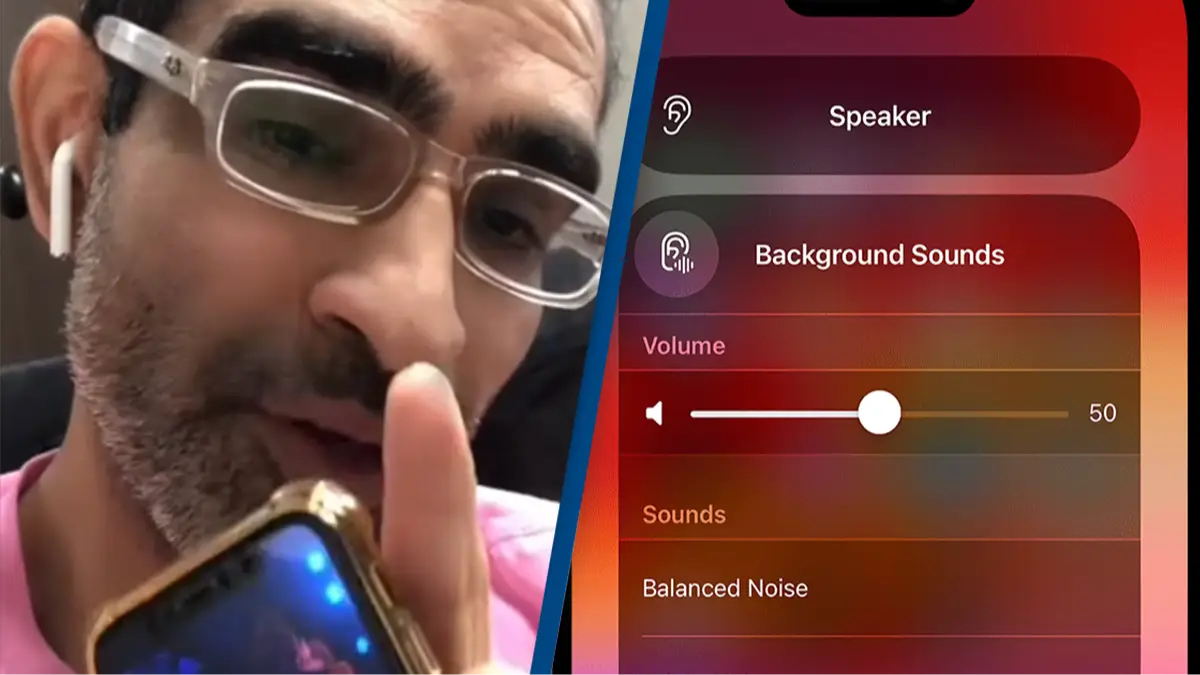
    First, you need to call up the 'Control Center', then tap the 'Hearing' button - if you can't see it, add the Hearing button to Control Centre.

    Now exit out of there and swipe down from the top right of your screen and you should find a little ear - tap it.

    CEO of Apple Tim Cook rolled out 'Background Sounds' on all new iPhones. (Alexi Rosenfeld/Getty Images)
    CEO of Apple Tim Cook rolled out 'Background Sounds' on all new iPhones. (Alexi Rosenfeld/Getty Images)

    Next, click on the 'Background Sounds' switch button to start or stop playing background noises.

    Then, press the name of the current sound to view other sounds, then choose a sound name to listen to a preview. After you’ve chosen a sound, tap 'Background Sounds' to go back.

    It's as simple as that; no more sleepless nights, no more closing your eyes and picturing complete darkness before having an urge to Google something completely random like 'what is the biggest stadium in the world'.

    Nope, none of that, just tune into the pitter patter of that rainfall, or the sound of waves rolling in.

    Choose your content:

    a day ago
    2 days ago
    3 days ago
    • Pier Marco Tacca/Getty Images
      a day ago

      AI expert issues chilling warnings about deepfakes after Italian Prime Minister shares AI lingerie photo

      Even laws around deepfakes won't fix the problem, the expert claims

      Technology
    • NBC Bay Area
      a day ago

      Doctor had college students take 9-week digital detox and revealed 'scary' impact on the brain

      'After I removed this negative presence, I realized all the positive aspects of my life,' one student said

      Technology
    • (Photo by Emanuele Cremaschi/Getty Images)
      2 days ago

      Playstation users who bought games within four-year period eligible for Sony $7.85 million settlement

      Sony has been accused of monopolizing the market through its PlayStation Store

      Technology
    • Dhiraj Singh/Bloomberg via Getty Images
      3 days ago

      iPhone users can check if they’re eligible for Apple's $250m payout over AI accusations

      The payout applies to people who bought certain iPhones between June 2024 and March 2025

      Technology
    • These are all the amazing new iPhone features you can get from new iOS 18 that’s out now